AI-Powered · 100% On-Device

Practice with Control

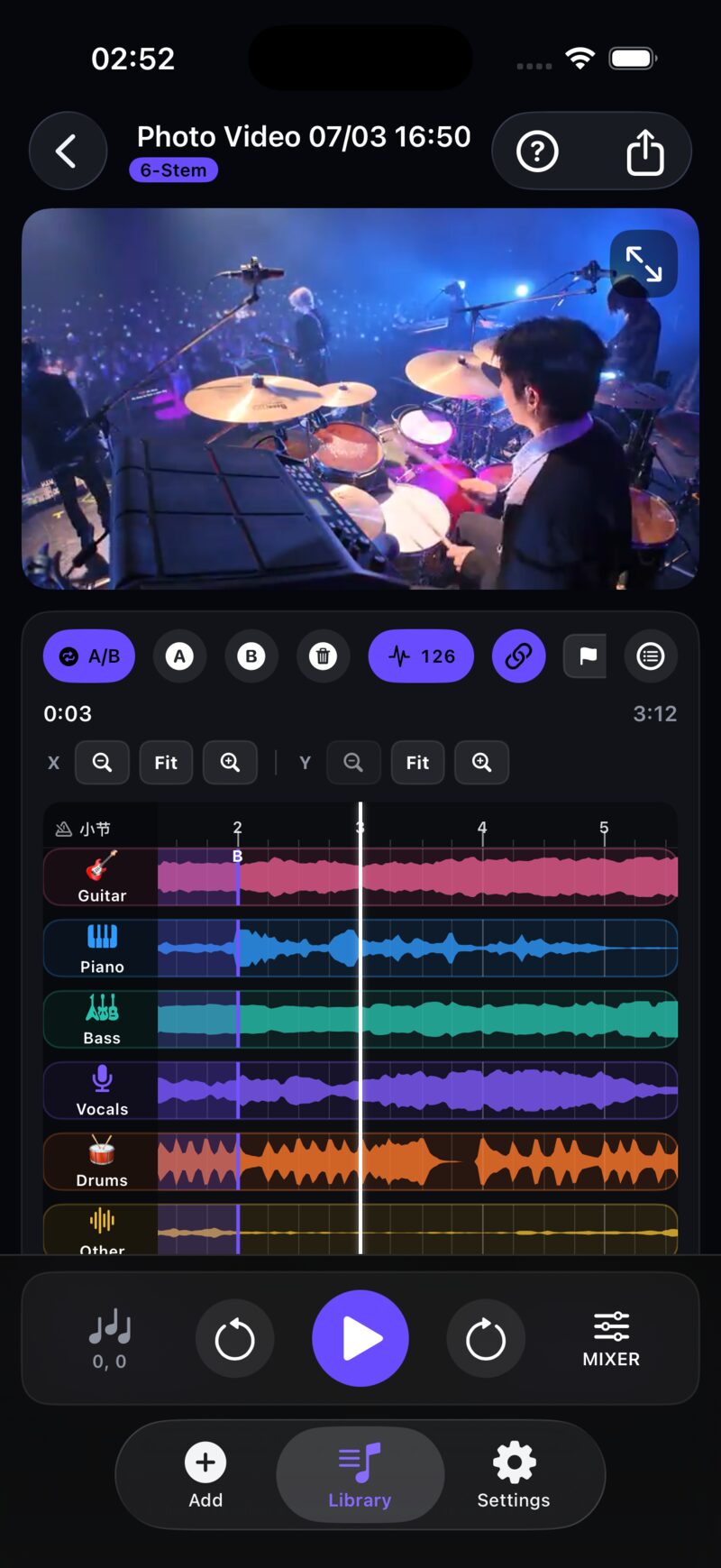
Separate any song into isolated stems. Mute vocals, solo the drums, slow it down — practice every phrase with the control you need.

4 4-Stem Mode
6 6-Stem Mode
100% On-Device

Built for Practice

Designed for band rehearsal and instrument practice — everything revolves around a controlled practice experience.

AI Stem Separation

Powered by Meta Demucs via CoreML, split any song into vocals, drums, bass, and other instruments. Choose between 4-Stem and 6-Stem modes.

Vocals Drums Bass Other

Video Track Player

Watch the original music video while controlling each track independently. Mute vocals to jam, solo the bass to learn — video and audio stay perfectly synced.

AB Loop · Speed · Pitch

Set AB loop points and repeat tricky sections. Slow down without changing pitch, or transpose to any key. Save multiple practice segments.

Record & Capture

Record rehearsal audio or video on the spot, then use AI separation to isolate each player's performance. Compare yourself to the pros.

Practice Made Simple

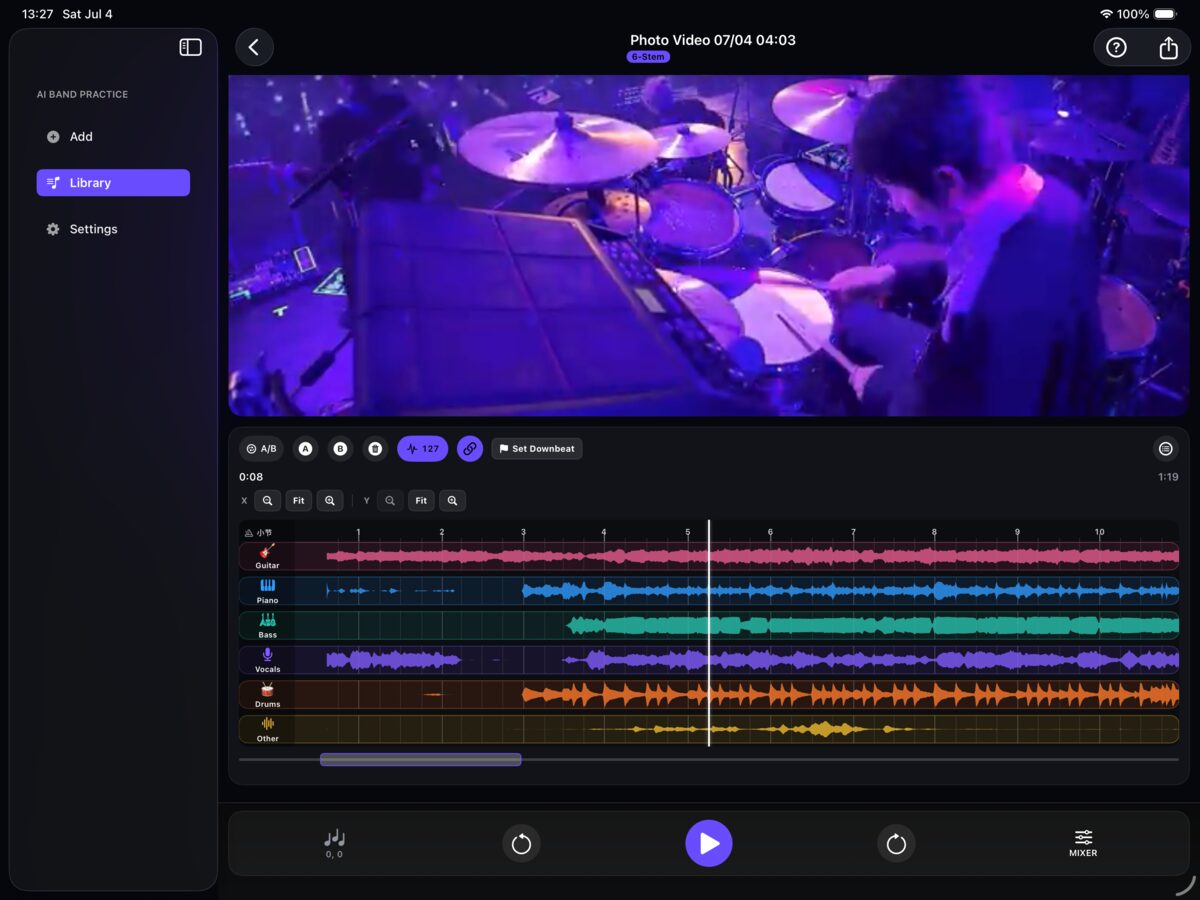
AI auto-separates stems. Independently control each instrument — all on your device.
SplitJam Desktop
SplitJam iOS
iOS
AI Stem Separation Meta Demucs CoreML engine, on-device processing
Independent Track Control Mute / solo / volume / pan per track
Speed Without Pitch Shift 0.1x - 2.0x speed range, any key or pitch
AB Loop Practice Set points, loop, master the hard parts, save as presets

Every Stem, Color-Coded

Each instrument has its own color — instantly recognizable in waveforms and timelines.

Vocals Vocals
Drums Drums
Bass Bass
Other Other
Guitar Guitar
Piano Piano

6-Stem mode requires Pro subscription · 4-Stem mode available for free

Three Steps to Practice

From import to practice, just seconds.

1

Import a Song

Import from Music library, Files app, or record audio/video on the spot

2

AI Separates Stems

On-device CoreML engine separates your song into isolated stems — no internet required

3

Start Practicing

Mute vocals to play along, slow down drums to learn rhythms, set AB loops to master hard passages

Not Just Another Splitter

SplitJam is a controlled music practice experience at its core.

Private by Design

All AI processing runs on-device via CoreML. Your audio never leaves your device. Your practice stays yours.

Video-First

Not just an audio tool. Practice with the original MV or live performance — musical context at a glance.

Made for Bands

Drummers lock into rhythm, bassists follow the root, guitarists learn solos, singers hear vocals — every musician finds their way to practice.

Free to Start, Yours to Keep

No paywall, no signup - just download and play.

Free Download

Get it straight from the App Store

No Signup

Open and play, no account needed

Yours Forever

Install once, keep it for good

Download on the App Store

Have Questions?

Everything you need to know about SplitJam.

SplitJam is powered by Meta's Demucs — one of the most advanced open-source audio source separation models. In real-world tests, it delivers excellent results on pop, rock, and electronic tracks. Vocal and drum separation is especially clean. On dense mixes, guitar/piano separation may vary by song.

No. All AI separation runs on-device via CoreML — no internet required. Your audio never leaves your device, and you can use SplitJam in Airplane Mode.

SplitJam is free to download and use. The free tier includes 4-Stem separation (vocals/drums/bass/other), 3 separations every 7 days, basic playback speed and volume, and single-track export. Upgrading to Pro unlocks 6-Stem mode (adds guitar/piano), unlimited separations, full speed 0.1x–2.0x, pitch shift, multi-segment saving, multi-track/mixdown/video export, and more.

SplitJam supports iPhone, iPad, and Mac with Apple Silicon (M1 and later). iPhone 12 or newer is recommended for the best separation speed. Older devices may take longer to process.

Pro subscription is managed via Apple App Store. Go to iPhone Settings > Apple ID > Subscriptions > SplitJam Pro to view or manage your subscription. It auto-renews; cancel at least 24 hours before expiry.

Audio: MP3, M4A, AIFF, WAV, AAC. Video: MP4, MOV, M4V. Import from Files app, Photo Library, or downloaded Apple Music tracks.

Ready to Practice?

Download SplitJam for free and experience AI stem separation today.

Download on the App Store

Free to use · No registration · 3 separations in 7 days